
Know who's calling.
Before you say hello.
Connect incoming calls with client and patient information, giving your team the context they need to deliver a more personal, efficient experience.
- Instant caller identification
- Client and patient context
- Recent call activity
Currently supported: RingCentral + Vetspire. Additional integrations are planned. Activation is subject to onboarding.
ClienTail shown with Vetspire
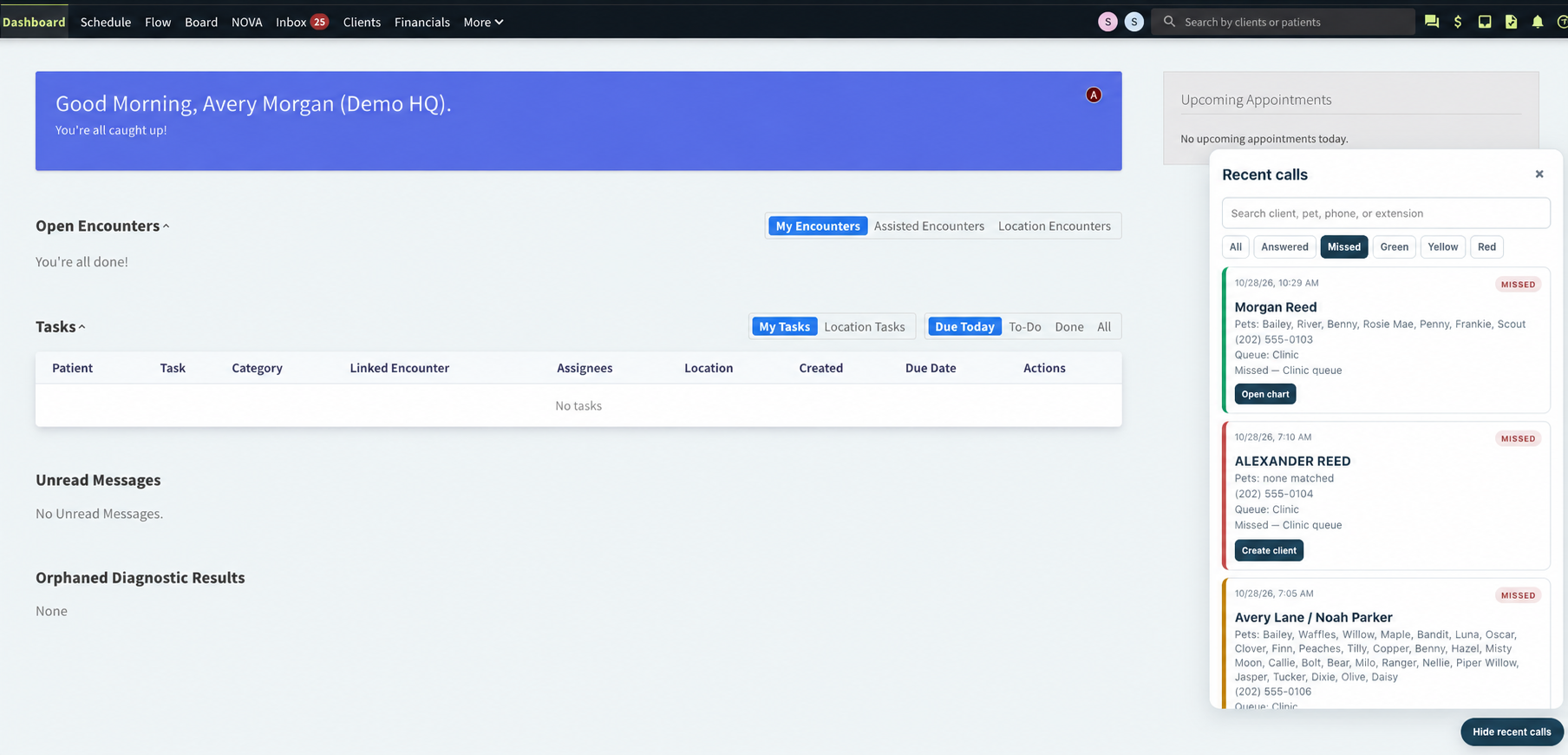
Example of ClienTail's current RingCentral and Vetspire integration.
From incoming call to client context.
ClienTail bridges your phone system and practice management software, bringing relevant caller information into your team's everyday workflow.
A call comes in
When someone calls your practice, ClienTail receives caller information from the connected phone system.
ClienTail identifies the caller
The phone number is checked against records in the connected practice management system to identify available client matches.
Your team gets the context
Available client and patient information is presented within the supported workflow, helping your team recognize callers and access relevant records.
The right context. At a glance.
Every incoming call is an opportunity to recognize a client. ClienTail uses three clear match states to help your team understand who's calling.
Recognize your client
A single client record matches the incoming phone number. Available client and patient information appears in the caller card.
Find the right record
More than one client record shares the incoming phone number. ClienTail helps your team identify the correct client.
Welcome a new caller
No client record matches the incoming phone number. The caller may be new or calling from a different number.
Match states describe phone-number matching results, not verified caller identity. The current RingCentral + Vetspire integration displays these states within Vetspire.
More than a name on the screen.
Recognizing a caller is just the beginning. ClienTail helps your team connect incoming conversations with recent activity and relevant client information.
Recent call history
Review recent incoming call activity directly within your supported practice management workflow.
Missed-call follow-up
Identify calls that were missed and use the available caller information to support follow-up.
Client record shortcuts
Open matching client records, review available pet information, or copy the caller's phone number.
Workstation integration
Bring caller information to authorized workstations through a lightweight browser extension.
Built to connect with the tools you use.
ClienTail is designed to connect communication platforms with veterinary practice management systems, helping your team access relevant caller context within their existing workflow.
RingCentral
Connected phone system providing incoming call information to ClienTail.
Vetspire
Connected practice management system displaying caller matches and available client information.
More integrations are on the way.
We're working toward broader compatibility with phone systems and veterinary practice management platforms. Tell us which tools your practice uses so we can discuss current compatibility and future options.
Ask About CompatibilityCurrent integration: RingCentral + Vetspire. Additional integrations are not yet generally available. Setup and activation are subject to compatibility review and onboarding.
Simple to set up. Easy to use.
We help you connect your communication tools and prepare your practice so your team can start recognizing callers within their existing workflow.
Check compatibility
Tell us which phone system and practice management platform your team uses.
Prepare your practice
We configure the supported integration and provide activation instructions for your team.
Connect workstations
For the current integration, install the ClienTail browser extension and authorize each participating workstation.
Start recognizing callers
Once activated, ClienTail displays available caller information within the supported practice workflow.
What you'll need
- A supported phone system
- A supported practice management system
- Google Chrome or Microsoft Edge for the current integration
- Authorized workstations with access to the practice system
Current supported integration: RingCentral + Vetspire. Activation instructions and setup requirements may vary for future integrations.